
Guide

Apple Watch Workout: How to Train With Your Watch

An Apple Watch workout is at its best when the watch does more than count calories in the background. Used well, it keeps you on pace during a run, tells you when your rest is over in the gym, and shows you how hard you're really working through your heart rate. That way you can leave your phone in your bag and focus on training.

Here's how to get useful data from your watch, for strength training, running and walking alike, and how to avoid the habits that make the numbers less reliable.

Download on the App Store3 days free
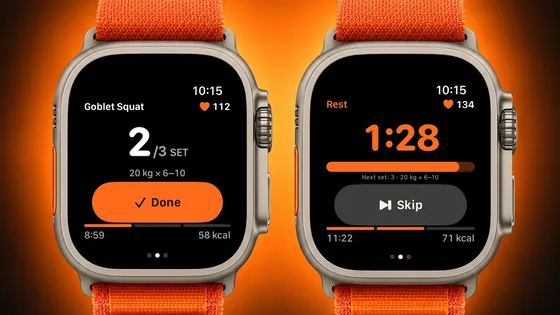
Two Apple Watch Ultra watches, one showing a squat set with a button to finish it, the other a rest countdown

Get accurate readings first

Your watch measures heart rate with optical sensors on the back, so fit matters.

  • Wear it snug and a finger's width above your wrist bone during training. A loose band slides around and can produce gaps or odd spikes.
  • Use a sport band or loop for workouts, especially on sweaty days.
  • Keep your age, height and weight up to date in your settings, since many estimates depend on them.
  • Start the workout before you start moving, and end it when you're done, so warm-up and cool-down are recorded properly.

Exercises with a lot of wrist flexion, like heavy grip work or push-ups, can occasionally throw off a reading. Look at the trend over the session rather than any single number.

Strength training with Apple Watch

Lifting is where most people underuse their watch. A few habits make a big difference:

  • Track sets and rest, not just time. Knowing exactly when your rest ends keeps sessions efficient and consistent from week to week.
  • Use heart rate to judge recovery. If your heart rate is still very high when the next set starts, you may need a little more rest on heavy lifts.
  • Don't chase the calorie number. Calorie estimates for strength training are rough. Your log of weights and reps tells you far more about progress.

Running and walking with your watch

For cardio, your watch is a coach on your wrist.

  • Heart rate zones help you control effort. Most of your easy runs and walks should feel conversational, in the lower zones. Save the higher zones for intervals and hard efforts.
  • Watch your pace and distance live instead of guessing, and look back at splits afterward to see whether you started too fast.
  • Walks count. Brisk walking is one of the easiest ways to add movement on rest days, and tracking it keeps you honest about how much you actually move.

Mistakes that skew your data

  • Logging the same workout twice, for example on your watch and again in a phone app. Double entries also double your calories burned.
  • Ignoring that calorie estimates are rough.
  • Looking at numbers instead of how you feel. Data is helpful, but sleep, energy and soreness matter too.
How My Form works on Apple Watch

My Form has its own watch app that brings your plan to your wrist. During a session it walks you through each set, tracks your pulse, and a single tap marks a set as done before the watch guides your rest.

  • Strength workouts from your plan, set by set, with rest on your wrist
  • Cardio with heart rate zones, distance and pace
  • No plan needed for a quick run, a walk or a strength session of your own
  • Water and meals: when no workout is running, log them on your watch, and the entries sync to your iPhone
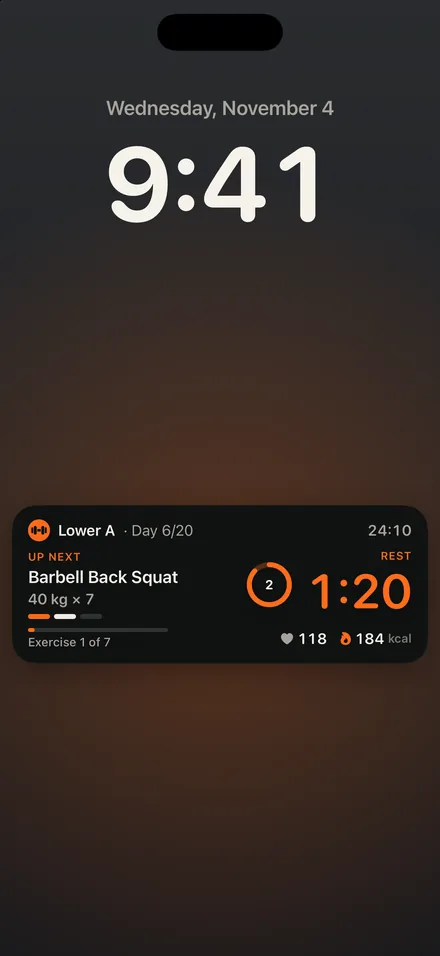
  • Live Activity: your iPhone Lock Screen and Dynamic Island keep showing where you are in the workout, even when the watch is doing the guiding

In the app, runs and walks come with a route map, elevation gain and a split for every kilometer. Connecting Apple Health is up to you; when it's on, your workouts and confirmed meals are written there, and heart rate is the one thing the app pulls back. The watch app requires watchOS 26.

iPhone Lock Screen with a Live Activity showing the current exercise, set and rest

Frequently asked questions

Do I need an Apple Watch to use My Form?

No. Everything runs on iPhone alone. The watch is an extra: it brings set and rest guidance, live heart rate, and quick water and meal logging to your wrist.

Can Apple Watch track strength training?

Yes. It can record your session time and heart rate, and with an app that follows your plan, it can also guide each set and your rest periods. For progress, the weights and reps you log matter more than the calorie estimate.

How accurate is Apple Watch heart rate during workouts?

For steady activities like running and walking, readings are generally reliable when the watch fits snugly. During lifting, wrist movement and grip can cause brief gaps or jumps. Wear it snug, a little above the wrist bone, and judge the trend rather than single readings.

What heart rate zone should I train in?

It depends on the session. Easy runs, walks and recovery work belong in the lower zones, where you can still talk. Intervals and hard efforts push into higher zones for short periods. Most people benefit from spending the majority of their cardio time at easy effort.

Can I start a run on my watch without a plan?

Yes. With My Form, runs and walks start on the watch without a plan, and you see your heart rate zone, distance and pace as you go.

Put your workout plan on your wrist

The watch guides your sets and rest and measures your heart rate, and your iPhone shows it all on the Lock Screen. 3 days free: trial for eligible new subscribers. Then from €7.99 a month or €49.99 a year; the App Store shows the price for your country.

Download on the App Store