
Guide

Calorie Counting and Macro Tracking: A Practical Guide

Calorie counting means keeping a rough record of the energy you eat so you can compare it with a target. Macro tracking goes one step further and splits those calories into protein, carbs and fat. Done well, both are simply tools for awareness: they show you what a normal day of eating actually looks like, which is often different from what you think.

You don't have to be perfect for it to work. Being consistently close is far more useful than being precise for a week and then quitting. Here's how to count calories in a way you can keep up.

This guide is general information, not medical advice. If you have a health condition or a history of disordered eating, talk to your doctor before counting calories.

Download on the App Store3 days free
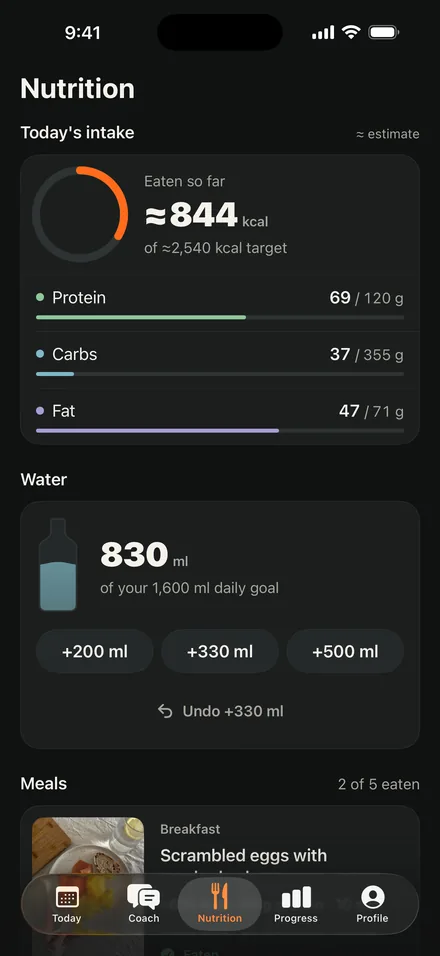
My Form Nutrition screen with calories, protein, carbs and fat logged for the day

Calories and macros in plain terms

Every food's energy comes from three macronutrients:

  • Protein: about 4 calories per gram. Important for muscle, recovery and feeling full.
  • Carbohydrates: about 4 calories per gram. Your main fuel for training and daily activity.
  • Fat: about 9 calories per gram. Needed for hormones and absorbing some vitamins, but very energy dense.

Alcohol adds about 7 calories per gram, with no useful nutrients. Your calorie target decides whether your weight goes up, down or stays put over time. Your macro split shapes how you feel, how you train and how much muscle you keep along the way.

How to set your targets

Start with an estimate of your maintenance calories from a calculator or an app. If your goal is fat loss, eat a bit below that; for muscle gain, a bit above; to maintain, stay close to it.

For macros, a simple order works:

  • Set protein first. It's the macro most people under-eat. Spreading it across your meals instead of saving it all for dinner makes it much easier to reach.
  • Then fat, in moderate amounts, from foods like olive oil, nuts, eggs and fish.
  • Fill the rest with carbs, more on training days if that helps your energy.

Remember that every target is an estimate. Before you change anything, make sure you've logged honestly for a while; most surprises turn out to be untracked bites, not a wrong target.

How to log food accurately enough

  • Weigh things for the first week or two. A kitchen scale teaches you what 100 grams of rice or a tablespoon of peanut butter really looks like. After that, you can eyeball most foods.
  • Log as you eat, not at night. Memory is unreliable, and missed snacks are where most counts go wrong.
  • Count oils, sauces and drinks. Cooking oil, dressing, creamer and juice are easy to forget and easy to overdo.
  • Use raw weights when you can. Pasta and rice change weight a lot when cooked, so stick to one method.
  • Repeat meals. If you eat the same breakfast most days, logging gets faster and more accurate.

Common calorie counting mistakes

  • Trusting labels and apps blindly. Food labels and nutrition databases are approximations. That's fine; just be consistent.
  • Eating back every calorie your watch says you burned. Activity estimates can be off. Treat them as a rough guide, not a budget.
  • Going too low. Very low intake leaves you tired, hungry and more likely to give up. A moderate approach lasts longer.
  • Letting the numbers run your mood. If tracking starts to feel stressful or obsessive, take a break. It's a tool, not a test.
How My Form makes calorie counting easier

My Form starts with a plan: it calculates your daily target for calories, protein, carbs and fat and gives you meals that already fit it.

  • A clear daily target for calories and each macro, so you always know what you're aiming for
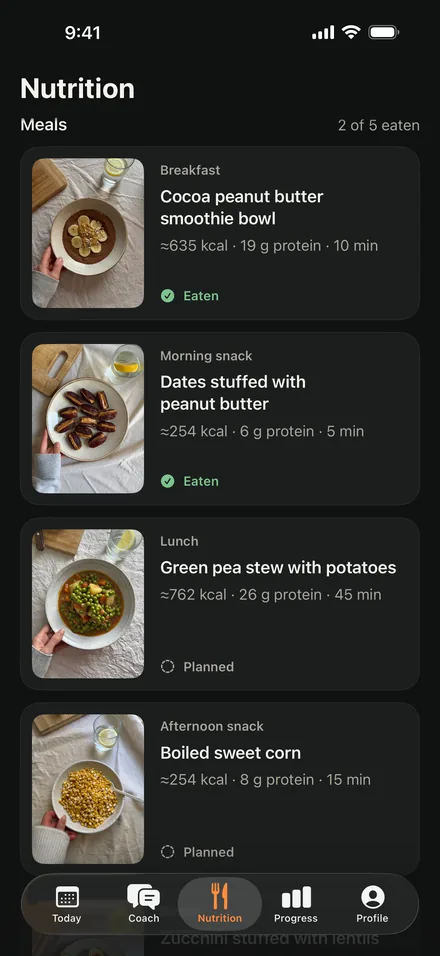
  • Mark a meal as eaten and your intake updates right away against your target
  • Portions in grams in every recipe, which takes the guessing out of logging
  • Water in one tap: +200, +330 or +500 ml
  • Log meals and water on Apple Watch when no workout is running, and the entries sync to your iPhone

All calorie and macro numbers in the app are estimates, not medical advice, and the app says so.

My Form Meals screen listing today's meals with recipes and grams

Frequently asked questions

Is calorie counting necessary to lose weight?

Not strictly. You lose weight by eating less energy than you burn, and some people manage that with portion habits alone. Counting calories simply makes the process visible, which helps many people understand where their intake is coming from and adjust more precisely.

What's the difference between counting calories and counting macros?

Counting calories tracks total energy. Counting macros tracks protein, carbs and fat, which add up to those calories. Macro tracking gives you more control over things like protein intake, which matters if you're training and want to keep or build muscle.

How accurate does calorie counting need to be?

Accurate enough to be consistent. Labels and databases are already approximations, so chasing perfect numbers isn't worth the stress. If you log the same way every day and your weekly trend matches your goal, your counting is accurate enough.

Should I count calories forever?

Most people don't need to. A few weeks or months of tracking teaches you portion sizes and the calorie content of your usual meals. After that, many people switch to tracking only protein or check in for a week now and then.

Do I need to weigh my food?

Weighing helps a lot at the start because it calibrates your eye. Once you know what normal portions look like, you can estimate most meals and weigh only the calorie-dense foods like oils, nut butters and cheese.

Count calories with a tap

Get a daily calorie and macro target and mark meals as eaten to see your intake right away. 3 days free: trial for eligible new subscribers. Then from €7.99 a month or €49.99 a year; the App Store shows the price for your country.

Download on the App Store